Address
https://nfsu2.xyz/ on HTTPS. Localhost is the only insecure exception in the self-host notes.
Source: PLAYING.md · checked 2026-10-28
Play
Open nfsu2.xyz in an up-to-date Chrome or Firefox that can use WebGPU, then press Play or Enter. Nothing is installed and no EA account is required. The first visit fetches about 7 MB of code. Game data streams while you play. Preloading about 2 GB is optional. Keyboard, controller, wheel, and touch are all documented.
https://nfsu2.xyz/ on HTTPS. Localhost is the only insecure exception in the self-host notes.
Source: PLAYING.md · checked 2026-10-28
Latest Chrome, and Firefox with WebGPU. The page must be a secure context.
Source: PLAYING.md · checked 2026-10-28
About 7 MB of game code, then streamed data. Movies stream later.
Source: PLAYING.md · checked 2026-10-28
About 2 GB on disk, about 1.4 GB over the network, movies excluded.
Source: PLAYING.md · checked 2026-10-28
Evidence note: figures attributed only to one publication or to the project's own documentation are single-source reports. The project site, README and playing notes count as one source group. Sources and checked dates are shown with each fact.
I stepped through the public start page the way VRacer’s 22 October video does: Play, a wait for the module, then the game’s own menus. The page I read does not offer an EXE. FSXNOOB’s 25 October video calls the first transfer about 2.9 GB. VRacer’s on-screen note says 2.0 GB. The project notes say an optional preload of about 2 GB, roughly 1.4 GB on the wire. I am leaving all three numbers on the page.
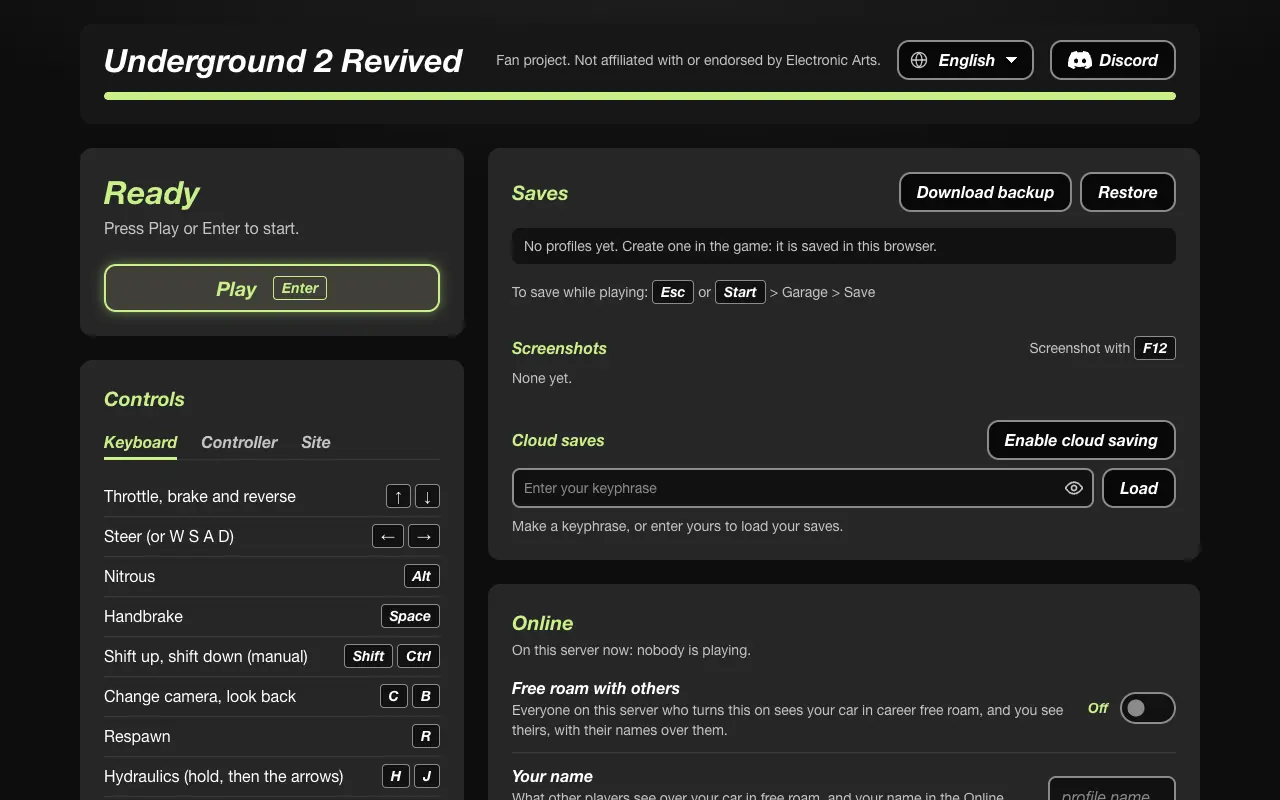

Press Play once the module has loaded. The notes say that takes a second or two and that the page shows a problem only when there is one. Sound starts on that click. If the browser blocks audio, a later click or key press turns it on. A controller button does not count for that unlock.
After one successful visit, the page can start a cached copy when the server is unreachable. The start page then says Offline. Free roam and Online still need the server. Saves stay in the browser either way.
These live on the start page and apply the next time you press Play. They are the project’s settings.ini keys, not a separate launcher.
| Group | What you can change | Source |
|---|---|---|
| Game | Language, movies, subtitles, autosave | PLAYING.md |
| Display | Resolution scale, frame cap 30/60/120/240, fullscreen, HUD | PLAYING.md |
| Controller | Rumble, dead zones. Firefox has no rumble. | PLAYING.md |
| Online | Name, free roam, crews, horn, room | PLAYING.md |
The playing notes list English, French, German, Italian, Spanish, Dutch, Swedish, Danish, Korean, Chinese, Japanese, Russian, Thai, Portuguese (Brazil), Polish, and Turkish for menus. Dubbed voices need a language pack on the server: French, German, Italian, Spanish, Japanese, and Russian. Portuguese, Polish, and Turkish are text. This site’s language pages are guides, not those in-game packs. The in-game list was also visible in the project’s main.js during research.
You must download 2 GB before the first race. Preload is optional. Streaming is the default path in PLAYING.md.
Any browser will do. The project names Chrome and Firefox, and the page has to be HTTPS.
VRacer walks through the nfsu2.xyz start page, a save restore, and an online race on 22 October 2026. Uploaded 2026-10-22. The player loads only after this click.
Open nfsu2.xyz, press Play, and wait for the module. Use Chrome or Firefox.
No. TheGamer and the project both describe the public site as account-free.
PLAYING.md says about 2 GB optional preload and about 1.4 GB on the network. VRacer shows 2.0 GB. FSXNOOB says about 2.9 GB. Cache, movies, and the day of the build can change what a creator sees.
A cached copy can start when the server is down, if you already preloaded data. Other players will not be there.
On the controls page. The start page also lists them under Controls.
Last checked: 2026-10-28. Where only one source states a number, the sentence says so.